Features

Small app.
Every date covered.

KeepTrack does one job — keeping track of things that run out — and does it thoroughly. Here is all of it, the way you’ll actually use it.

3reminder offsets
6built-in categories
1 tapto renew
0accounts needed

Try it

Renewing takes one tap.
Go on, press it.

Pick a repeat type and press the button. It follows the same rule as the app: monthly and yearly items roll forward on their own, short months included, and one-time items take a new date.

  • MonthlyJanuary 31 renews to February 28: the next month is shorter, so the date lands on its last day instead of spilling into March.
  • YearlySame day, next year. Insurance, licences, memberships.
  • One-timeLibrary books, a repair, a return window. Give it a new date in a moment — in a month, six, a year or five.
Subscriptions

Family streaming plan

3days left
Due Sun, Jan 31, 2027 Next after renewal: Sun, Feb 28, 2027
  • RepeatsMonthly
  • Price$17.99

All features

Everything, grouped the way
you’ll use it.

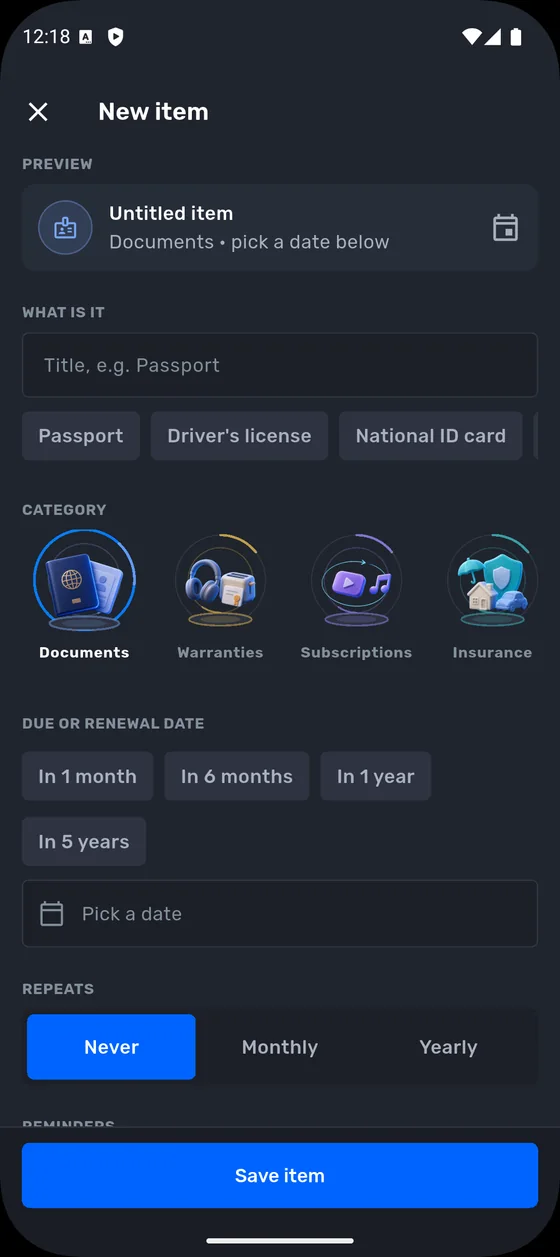
Add in seconds

Name it, pick a category, set the due date — done.

  • Quick titles: Passport, Driver’s license, National ID card
  • Quick dates: in 1 month, 6 months, 1 year or 5 years
  • Choose the heads-up: 30, 7 or 1 day before

See it at a glance

The radar is the home screen, and it’s live.

  • The nearer the centre, the sooner it’s due
  • Overdue items flagged first
  • Next up list with a clear countdown

One timeline

Every item, in date order, month by month.

  • Search by name
  • Filter: all, next 30 days or overdue
  • Narrow down by category
  • Sort nearest first, furthest first or A to Z

Renew with a tap

Confirm it, and the date takes care of itself.

  • Monthly and yearly items move to their next date
  • Short months handled for you
  • One-time items take a new date in a moment

Made for everyday life

The details you’d otherwise go hunting for.

  • Prices and currencies for subscriptions and contracts
  • Notes: policy numbers, where the receipt is, who to call
  • Default reminder time and alerts in Settings

Private by design

Nothing to sign up for, nothing watching.

  • No account and no sign-up
  • No tracking
  • Your items stay on your phone

Categories

Six to start with.
As many as you need.

The built-in categories cover the usual suspects. When they don’t, make your own with a name, an icon and a colour — like the one someone made for every gadget bought in a sale.

DocumentsPassports, ID cards, licences, visas
WarrantiesPhones, laptops, headphones, appliances
SubscriptionsStreaming, cloud storage, gym, apps
InsuranceCar, home, travel, health
Health & PersonalPrescriptions, check-ups, contact lenses
OtherEveryday items: library books, filters, returns
Home appliancesA custom category, made in the app
Your ownPick a name, an icon and a colour

Anatomy of an item

What one item can hold.

  • TitlePassport
  • CategoryDocuments
  • Due or renewal dateMar 14, 2029
  • RepeatsNever · Monthly · Yearly
  • Reminders30 d · 7 d · 1 d before
  • PriceAmount and currency
  • NotesPolicy number, receipt, who to call
New item screen with title, quick titles, category icons, quick dates and repeat options
KeepTrack app icon

Every date, in range.

Free on Google Play. Your first item takes seconds; the rest of the drawer follows faster than you’d think.